Wednesday, 8 March 2017

Meet Bill Biko, the Landlord Who Transformed His Expertise Into an Online Course Business

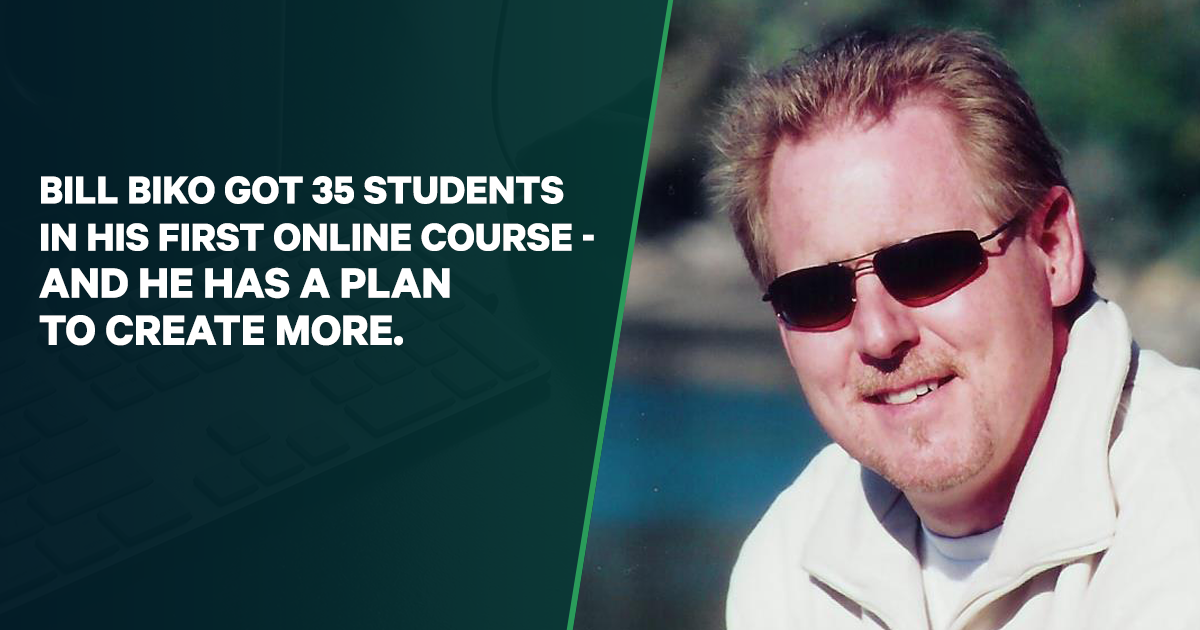
Over the past 14 years, Bill has had over 1,500 short-term rental tenants. With all that experience, he’s considered a go-to resource for landlords in Canada.

(This isn’t uncommon. We all have something we’re good at that other people want to learn… it’s often tied to what you do for a living. Especially if you’re a consultant or coach).

A few years ago, Bill started promoting his real estate ventures online. After seeing some success, he started selling products as well and created an eviction guide for landlords. His long-term goal for his online business is to eventually replace his rental income:

“I really want to turn this into a business that replaces a lot of my rental income. I want to get to a position where I don’t have to be stuck where I am. I want to have a little more flexibility.”

After he sold over 400 copies of his eviction guides, Bill knew he was onto something.

He’d been answering landlords’ questions for years and thought online courses would be a great way to teach them the business. But first, he had to choose a course idea his customers wanted to buy…

What Type Of Online Courses Do People Actually Buy?

Bill was facing a common issue among online business owners: Figuring out what your customers want.

It takes research and persistence to uncover the pains and desires of your audience…

“That’s something that I struggled with, giving that information for what people really wanted. It’s not really what they’re saying, it’s what they should be saying, and I’ve tried to fill in some of the gaps there.”

Seven Figure Courses shows you how to read between the lines of what you’re customers are telling you. Using our proven method for customer research made all the difference for Bill and his course…

He did it the old-fashioned way with direct mail, online surveys, and he also talked directly to his potential customers — my favorite.

Here’s what Bill found:

“What do people want? They usually don’t want what they think they want. When you actually listen to them explain their problems, it’s suddenly, ‘Well that’s not what you want. You’re looking for this.’”

Following the Seven Figure Courses training step-by-step led Bill to an “A-Ha!” moment for his business…

“[I learned] I’ve got to target more of these people that are getting people to buy property, or the realtors that are huge investors, and go, ‘Listen, I will make your investor that much more successful. I’ll make their landlord role that much easier.'”

Having a clear view of who your customers are can be the difference between a successful product and one that launches to crickets. And knowing what your customers want enables you to pick a course idea that will resonate with them:

“[Seven Figure Courses] helped me with narrowing down some of my avenues. I’ve got a whole binder with a bunch of the notes that I’ve taken as I’ve gone through the course, including looking at some of the competition and everything.”

All of his initial work led to Bill’s first course being a big success!

35 Sales and A Roadmap For More Courses

Based on his notes, Bill built a paid course that taught landlords how to properly screen their tenants.

“I have a basic screening course, which is one of the handiest things that I discovered many of these landlords need because they just have no idea how to go through the process.”

Most people think you have to build a big, fancy flagship course to make money selling online courses, but this is just a myth.

The key to a profitable online course is that it delivers a valuable outcome for your customers. Bill told me that his course has a handful of lessons, nothing too crazy. It’s what I call an “Entry-Level Course.” But his customers love it because they walk away knowing how to screen for problem tenants, saving their rental properties hundreds of dollars a year.

Since releasing the course, Bill already has 35 sales, at a conversion rate of about 4%!

And that’s not all…

Previously, Bill had targeted what he calls the “Ma and Pa Landlord.” These are landlords that have one to three properties. But as he learned during his research, these types of landlords weren’t going to be the best customers:

“I’ve actually had people say to my face, in phone calls, that they didn’t feel that they needed to buy any of my stuff because they got so much great information for free.”

To change this, Bill used the content strategies in Seven Figure Courses to get articles published in multiple landlord publications. Getting in front of new audiences has led to a different type of customer coming to his site…

“Now, it’s starting to turn into some of the bigger clients, where maybe they own an apartment building. Maybe they own 10 or 20 properties.”

Some of these bigger clients are even hiring Bill as a consultant. Amazing!

Bill has also created a free introductory course on landlording to build trust with his audience and grow his email list, which has almost doubled in size from 700 to about 1500 subscribers.

“I’m suddenly up to about 180 people who have gone through that course, and I’ve probably had about 30 sign up in the last month.”

With a steadily growing audience, Bill was smart in creating a free course. He’s able to immediately establish his credibility and show them the value his courses provide.

And now that Bill has built a system for growing his audience, he’s already hard at work creating his next paid course!

“Build It Right From the Start”

Look, building a business on your own is tough. Most of the time you feel like you’re throwing spaghetti at the wall hoping it sticks.

Bill saw just how hard it can be without a proven system to teach you how to do it right.

“If you’re going to do this, don’t screw around. Jump in with both feet. And make sure that you get the right training. This is the kind of training that can be really beneficial. It can point you in the right direction rather than have you flounder around for two or three years.”

Seeing that Bill and I were on the same page, I asked him what he thought of Seven Figure Courses:

“You might as well learn from someone who’s making money at it and doing it right. I’ve been following Derek since he first appeared on the scene. I like how he explains things. It’s pretty no-nonsense.”

Bill definitely has me pegged, I love it!

Have you been pushing off the opportunity to start your online course business?

Now is the time to take the plunge.

Join Seven Figure Courses today


source http://feeds.socialtriggers.com/~r/SocialTriggers/~3/sslrTD5qyYo/

How to Be Productive in a Social Media Dominated World

Is social media making you less productive?

Do you find yourself in tons of tabs, inundated by distractions, while trying to get work done?

In today's episode, I discuss how to be productive in a social media-dominated world.

Listen to This Episode

I've been doing a lot of reading lately. One of the books I'm reading is Deep Work.

The premise of the book is that deep work is one of the most valuable skills we can possess and while it's value is increasing, it's becoming increasingly rare.

It defines deep work as “Professional activities performed in a state of distraction-free concentration that push your cognitive capabilities to their limit.”

However, this social-media-dominated world is FULL of distractions.

But as a blogger, isn't it essential to be all over social media to be successful? It's 2017 and being “always on” has seemed to become the norm.

However, I believe that we've been fooled by some social media lies.

And yes, I believe that many of us (myself included) have become addicted to social media.

Listen to the episode, hear my thoughts, and then discover what I'm actively doing to try to reverse these problems in my life.

The post How to Be Productive in a Social Media Dominated World appeared first on Become A Blogger by Leslie Samuel.


source http://www.becomeablogger.com/24512/productive-social-media/

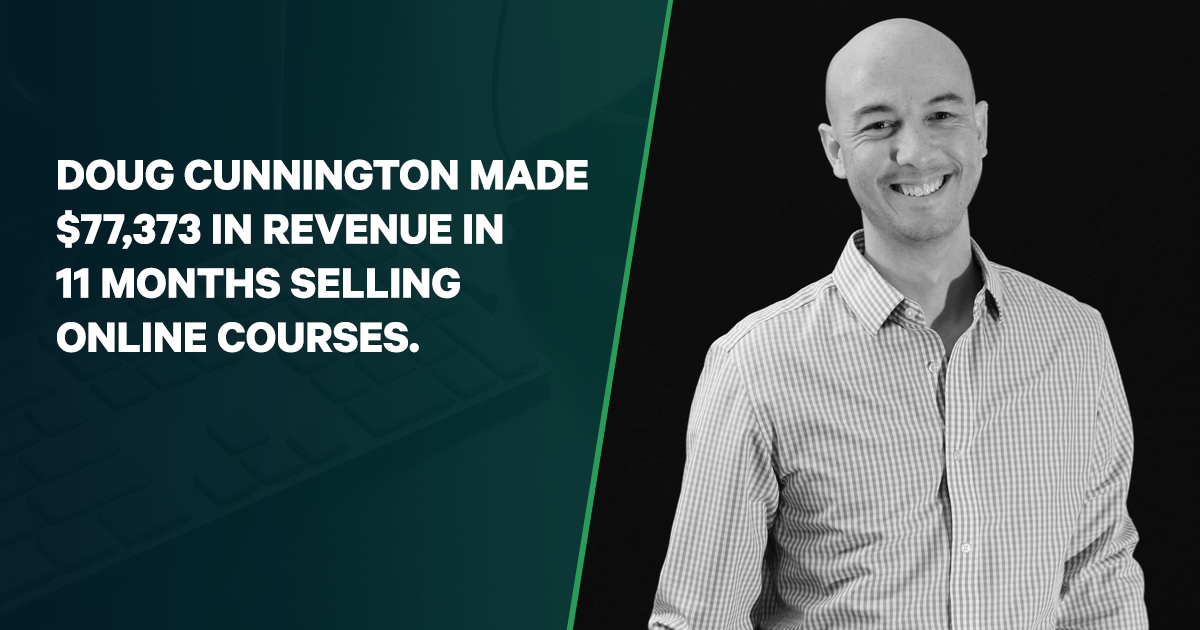
Behind the Scenes: How Doug Made $77,373 In 11 Months By Selling Online Courses

Doug is a marketer. And he wanted to share his expertise with others. So, he created an ebook, a typical “first step” for people who want to get into the business of creating and selling their knowledge online.

The ebook sold pretty well, so he thought he would take it to the next level by turning it into an online course. A smart idea.

But the course just didn’t sell… The ebook did well, but the course? It looked like a flop. However, Doug stumbled on one BIG insight after he went through “Seven Figure Courses.”

“I thought I already knew who my students were”

For 18 months, Doug’s course was available to his audience, but sales were sparse and he eventually retired it. The course just wasn’t resonating with his audience, which can torpedo the success of any online business.

There was also another issue…

Doug was laid off from his job in 2015. With his wife’s support, he was laser-focused on growing his online marketing business instead of getting another 9-5 job. And part of his plan was creating a second revenue stream from online courses.

So, he wasn’t just going to quit the online course game. But he was struggling to find a course idea his customers would want.

“I didn’t really understand how to connect the dots to create a product where people would actually use it and actually solve the problems that they have.”

For any product you create, you need to get into the minds of your potential customers. The biggest difference between a profitable online course and one that tanks is knowing the pains and desires of your audience.

“The book was okay to stand alone, but in the translation to a course, I skipped some critical steps.”

When you’re starting an online course business, it’s impossible to know what all these critical steps are. That’s why I created Seven Figure Courses… to give you a step-by-step system for creating profitable courses.

Doug also had some problems with the way he put his course on the market:

“I just had it for sale all of the time, so I never had it launched, and it just sort of slowly fizzled out as time went on.”

This is a mistake I see all the time. First-time course creators throw up a sales page and expect the money to start rolling in. But that’s not how it works. You need to be much more thoughtful and strategic, which is why there’s an entire module in Seven Figure Courses about launching the right way.

Hoping to fill in these gaps, Doug went back to the drawing board.

Customer Research For the Win!

After Doug created an ebook and a course on marketing, he thought he knew who his customers were. Even after he bought Seven Figure Courses, he didn’t think he needed to do his homework and figure out his customers’ pains and desires.

This mindset isn’t unique to Doug. When most people get an idea for a course, they immediately start creating content for it. Then, when they finish their course and launch it, they’re shocked that no one buys it.

But they really shouldn’t be shocked… Because MOST people don’t do any customer research. Or they do it wrong.

I don’t want you to be like most people. That’s why one of the first things you learn in Seven Figure Courses is how I do research at Social Triggers. This was the key to Doug turning around his course.

“The first part of Seven Figure Courses allows you to understand the problems your perspective students are having. And when you know that, you’re in a better place to position your course. I didn’t really understand who my audience was or who my students could be. And once I refined the initial research of the course, I knew that I had been selling it in a really amateur manner.”

This is the kind of thing other people simply don’t do. But it’s what separates the winners from the losers.

“Once I did the pre-work that Seven Figure Courses takes you through, I was able to get the people who could actually be helped by the course, and attract them using their own words, using copy they would be attracted to.”

Doug also completely revamped the way he sold his course. Instead of putting it up on his site to purchase anytime, it was only available during one of his four launches he did over the past year.

He also gave his customers the option of enrolling in a payment plan or paying in full.

By using our Seven Figure Courses launch sequences, Doug was finally able to show his audience how valuable his course was and move them from “not interested” to “take my money!”

Consistent Growth with Every Launch…From $0 to $30,863

With his course repositioned and ready to launch after taking Seven Figure Courses, Doug went into his first launch with a new mindset:

“Derek says to just do a $10K Launch first, maybe do a few $10K Launches. You’re not going to be able to do a $100K Launch on your second launch. It’s going to take some time to build up to it.”

Most people think their fate is tied to their first product launch. But if you’re starting an online course business, this just isn’t true. It’s a process, and you can learn from each and every launch.

For Doug, his hard work immediately started paying off…

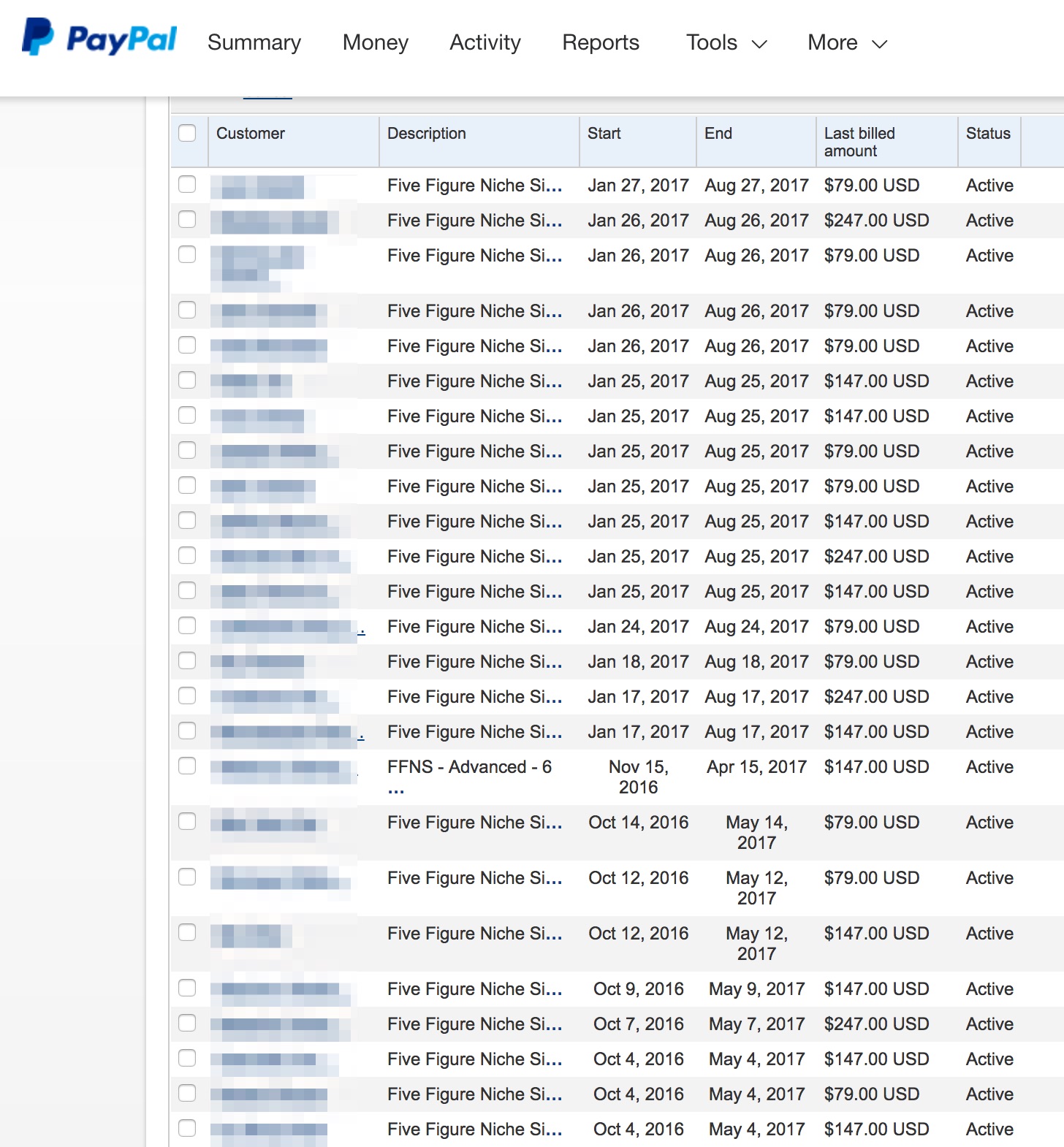
In March 2016, Doug launched his new course to the tune of $10,151. He launched his course again in July earning $16,211. He did it again in October for $20,148. His most recent launch in January 2017 netted him $30,863. And this is all with an email list of just 4,000 subscribers!

And remember how Doug started giving his customers the payment plan option in addition to paying in full? About half of his customers sign up for monthly payment plans, which brings in a steady $3,327 a month! Doug loves the dependable income he receives every month from the monthly plans:

So what does Doug attribute to his success? Using the feedback from his customers to make steady improvements on his online course business.

Whether it’s creating new launch content, refining sales copy, or tightening up your course, with each launch there’s a huge opportunity for growth.

“It’s really taking an iterative approach to launching and improving it as you go, focusing on a certain area before you try to do everything. Otherwise, it’s just too overwhelming.”

While Doug is thrilled about the growth of his online course business, he’s most proud of the fact he was able to support his wife after she was laid off in December 2016, about a year after he was laid off himself.

In fact, Doug and his family were still able to afford several trips they had planned last year.

Here they are visiting Old Faithful:

And here’s Doug with his family at Mt. Rushmore:

“Making an investment in education is a no-brainer.”

After hearing about Doug’s success, I asked him what he liked most about Seven Figure Courses…

“It helps you fast track knowledge that would have taken you a long time to discover on your own and implement. The other part is I know the support is top notch for a premium level course where you won’t get that in cheaper courses.”

Then he added:

“You have nothing to lose because there’s a money back guarantee. So, if you get in there and you can’t put it together and you are actually trying, there’s really no risk.”

I couldn’t have said it better myself.

Now the question for you is, are you ready to invest in yourself?

If you are…

Join Seven Figure Courses today


source http://feeds.socialtriggers.com/~r/SocialTriggers/~3/6_z66FIdRKg/

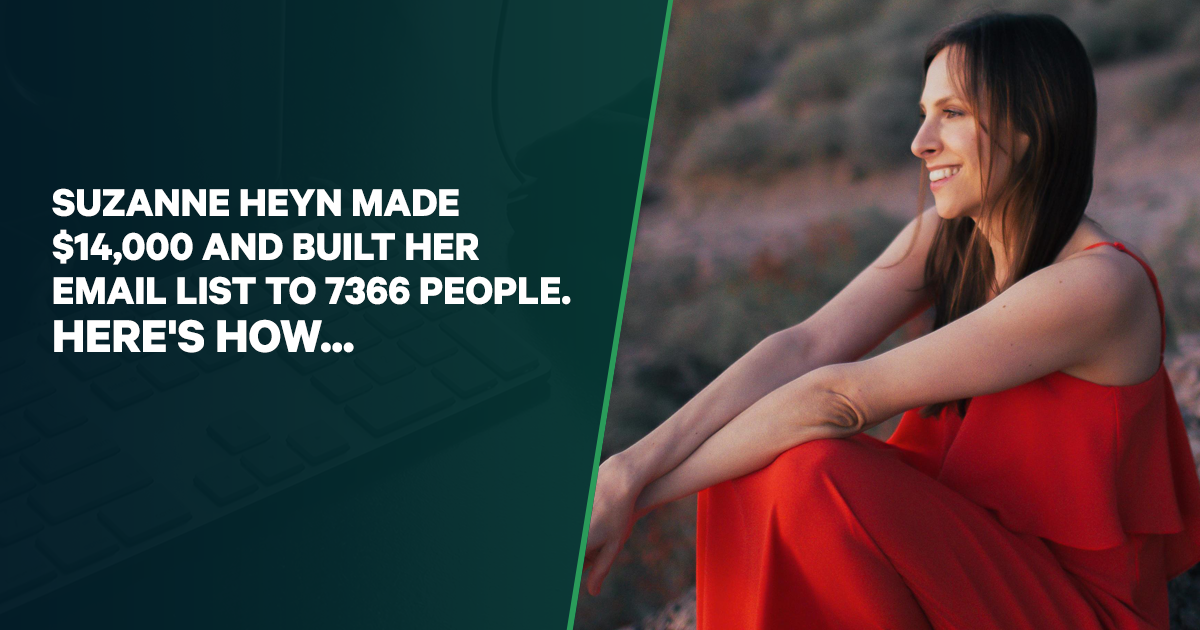
How Suzanne Heyn Grew Her Audience To 7,366 Email Subscribers (And Made $14,000 Selling Online Courses)

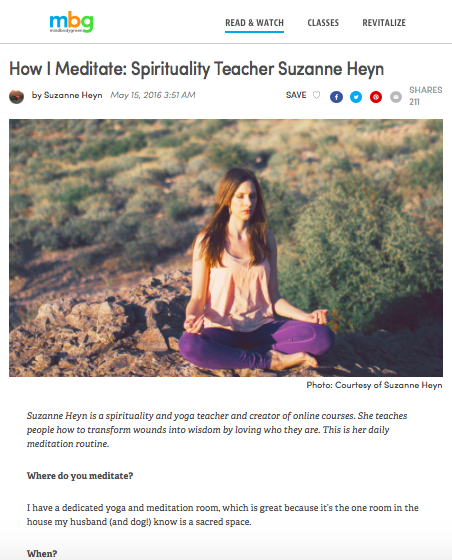
Suzanne Heyn is a spirituality and meditation teacher. She had a gift to share with the world, and she knew she could turn it into an online business.

The problem?

She knew she wanted to turn this skill and knowledge into an online course and sell it…

…But she was struggling:

“I’ve seen people become really successful and live their dream of a location-independent lifestyle, and I wanted that, too … but I still had nagging questions like: How much [content] do I have to include to make my course effective and worth the money? How do I launch a course and inspire people to buy it?”

This isn’t an uncommon scenario. People have passion. People have expertise. And they are GREAT at what they do, but when it comes to the “business” side of it… they get stuck… and Suzanne was stuck. She was inundated by questions she couldn’t find answers to, and unsure of how to make her dream a reality.

Then everything changed.

She doubled down on creating and selling online courses last year. She now has three flagship courses, a short course, and a free mini course that she uses as a lead magnet to grow her list. And she earned $14,000 just from selling these courses last year. She also built her email list to 7,366 people and expects to triple her revenue in 2017!

How did she do it?

Suzanne enrolled in my online course, Seven Figure Courses. She learned how to hone in on what her audience was struggling with and how she could help them. Then, she followed the easy, step-by-step framework for creating and launching courses to help her audience.

Creating An Online Course Doesn’t
Have To Be So Complicated!

Most people who want to create and sell online courses give up before they even get started because the whole process just seems impossible.

They don’t know how to get started. They don’t have an idea for a course. They think, “I’m not an expert. Why would anyone care about what I have to say?”

Well, Suzanne overcame all of these obstacles in Module 1 of Seven Figure Courses.

Before enrolling, she made things more complicated than they had to be. She was comparing herself to established businesses creating polished, 8-week, in-depth online courses. She was looking at complex, multi-week, multimedia launches.

But guess what?

Creating and selling online courses doesn’t have to be so complicated! Especially if you’re just getting started. And Seven Figure Courses breaks down this process step-by-step to keep you on the right track and make this as simple as possible.

“Seven Figure Courses helped me simplify things and realize a course didn’t have to be complicated. The POP Map showed me you can have smaller courses that can help people overcome obstacles.”

The POP Map is a strategy I teach inside Seven Figure Courses that helps you plan your entire course business. It helps you map out the pain your audience is experiencing, the pleasure they’re trying to achieve, and all of the obstacles in the way.

This was a huge a-ha moment for Suzanne.

From the POP Map exercise, she learned that you don’t have to spend months creating an online course and planning the perfect launch right off the bat. Instead, you can create smaller courses that solve only one or two obstacles your audience is experiencing. This allows you create and start selling an “Entry-Level Course” in no time at all.

So, how did she come up with the idea for her Entry-Level Course?

Inside Seven Figure Courses, Suzanne learned how to survey her audience the right way and uncover all of the obstacles that were holding them back.

“In surveying my audience and asking what they were interested in, I realized they wanted to learn more about meditation, which is something I hadn’t thought about. I didn’t realize people were struggling with it. I probably wouldn’t have created a meditation course if it wasn’t for Seven Figure Courses.”

Now, she sells that meditation course for $97. And she currently has 87 students enrolled, so it’s doing real well.

But, of course it’s not as easy as “build it and they will come.” You can’t just create a course and expect customers to fall from the sky at your feet.

So, how did Suzanne get customers for her online courses?

First, she needed to grow her audience. Then, she needed to sell to them.

From 600 to 7,366 Subscribers! (And Growing)

When Suzanne enrolled in Seven Figure Courses, she had 600 subscribers. That’s not bad, but she knew she needed to grow her audience if she wanted her online course business to really take off.

Well, in Module 2 of Seven Figure Courses, she learned exactly what she needed to grow her audience.

“With Derek’s encouragement, I recorded a guided meditation, which ended up being my lead magnet. That has brought in A LOT of email subscribers … When I started Seven Figure Courses, I had 600 subscribers, maybe. I had a guest article published on a big wellness site, and I pretty much doubled my list overnight from the traffic from that article being sent to my lead magnet.”

So, Suzanne used the list-building strategies she learned in Seven Figure Courses to create her lead magnet on meditation and write a guest post to get more traffic and subscribers.

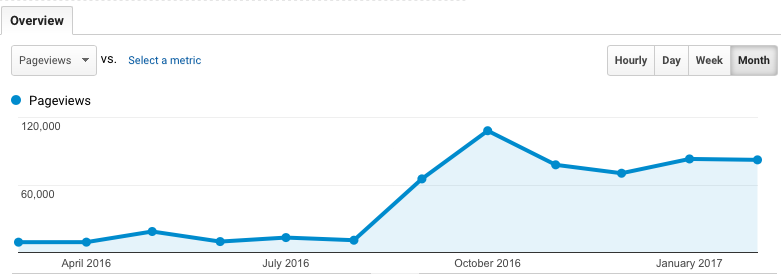
And as you can see from the screenshot below, her traffic exploded.

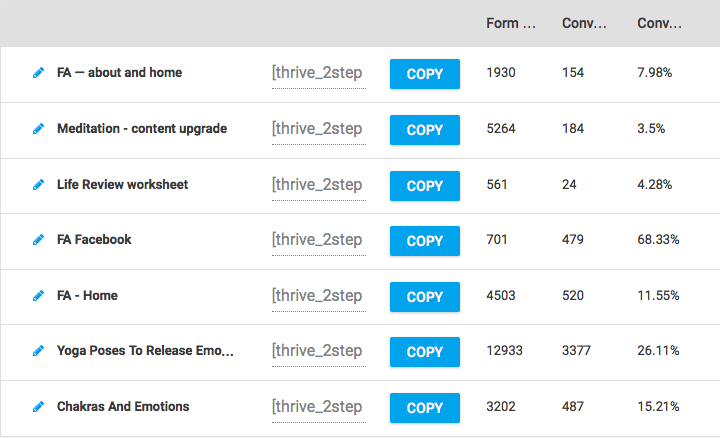
After the success of her guest post and lead magnet, she created more “content upgrades.” And, as you can see below, these content upgrades have raised her site-wide opt-in rate to over 5%.

And it gets better…

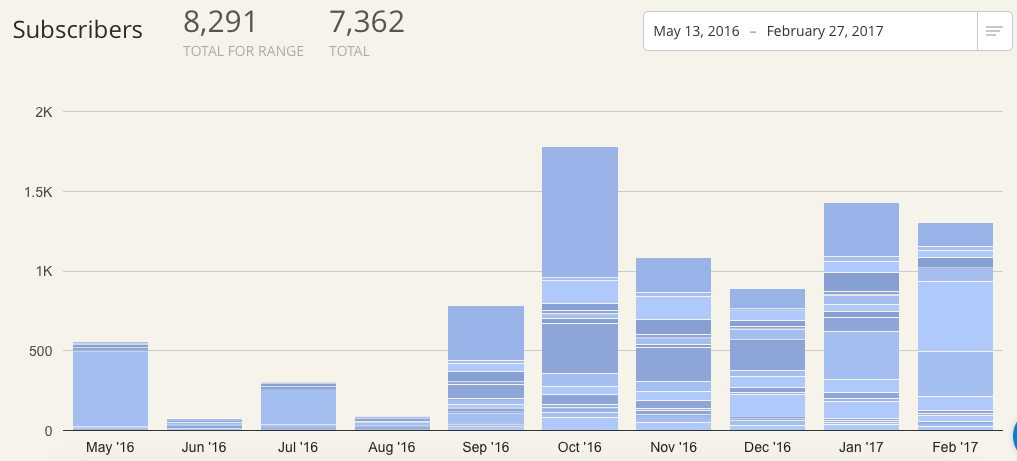
“At the end of 2015, I had 600 subscribers. Today, I crossed the 7,000 mark.”

Since enrolling in Seven Figure Courses, Suzanne’s list has grown by a factor of 12!

The lead magnet she created during Seven Figure Courses converted 3,397 subscribers alone. And her amazing audience growth led to her biggest single day of revenue at the end of 2016. Amazing!

Taking the Mystery Out of
Online Course Launches

Now, of course growing your email list is only one part of having a successful online course business. You also have to actually sell your courses. And like most people, Suzanne struggled with this.

“I had no idea how to launch. Derek is a master launcher. I always want his programs even before the sales page goes live. And I really wanted to learn how to replicate that in my own business.”

Again, Seven Figure Courses taught Suzanne how to keep things simple.

She learned that you can’t just “reverse engineer” someone else’s sales page. Instead, you have to really understand your audience and the psychology behind what makes a successful course launch. And Seven Figure Courses shows you how to do just that.

Because the truth is that you don’t need a complex, multi-week, multimedia launch to sell your course successfully. Seven Figure Courses makes launching a breeze. There’s an entire module dedicated to course launches (including a day-by-day breakdown of 3 different types of launches: The $10K Launch, The $100K Launch, and The Seven Figure Launch). And I show you how to figure out which launch is right for you and how to execute it the right way.

This completely changed Suzanne’s mindset when it came to launching her courses…

“Seven Figure Courses really helped me with launching because I felt like it was really complicated and Derek just made it really simple in a way that was very helpful. Seeing that you can have a more complicated launch, but that’s for later in your business, and instead, looking at your business in stages was really helpful.”

Since implementing these launch strategies, Suzanne has launched a course every 3 or 4 months and has converted more than 150 new paying customers. In 2016, she earned $14,000 just from selling her courses. That’s more than $1,000 per month in passive income. And she now has a clear path forward for growing her online course business.

“You can’t just Google a transformative experience.”

With a steady source of new email subscribers and money to reinvest in her business, Suzanne is now in a position to scale.

“I’m gearing up for my signature program in March. There’s a lot of excitement behind it because there’s not really anything like it out there. I have over 700 people in the course right now and my goal is 1,000.”

With the help of Seven Figure Courses, I believe she’ll reach that goal.

But success is about more than just the money. Success for Suzanne is about living the life she always dreamed of. It’s about the freedom that comes with running a successful online course business.

“My husband has a great job, but he’d like to do other things. So, I’d like to give him the same freedom he’s given me.”

And now she can.

Before Suzanne enrolled in Seven Figure Courses, she was lost. She had experienced some success with her business, but couldn’t figure out how to replicate it over and over again for long-term growth. She knew she needed help, but like most people, she was worried about investing the money when she wasn’t 100% sure it would pay off.

“Seven Figure Courses came out at a really interesting time because I had just made money from my first launch, but I was doubting whether I wanted to spend the money. I always valued Derek’s expertise and how he runs his business as a real business. It’s not just internet marketing, it’s so much more.”

She enrolled in Seven Figure Courses and never looked back.

“People get so caught up in their fear and wondering what could go wrong. Whether you want to start a business or take a course, it’s always that same internal story that you have to overcome. Something I’ve learned in my life is the greatest fear is not making a decision and failing, the greatest fear is not trying.

Putting my gifts out into the world has been so transformative. It’s not only transformed other people’s lives but it’s transformed my own.”

And she couldn’t be more right. Seven Figure Courses has the potential to truly change your business and your life. It takes letting go of that fear of failure and trusting the process. And Seven Figure Courses gives you a proven process you can trust.

So, are you ready to become the next Seven Figure Courses success story?

Join Seven Figure Courses today


source http://feeds.socialtriggers.com/~r/SocialTriggers/~3/pXvj85QE8mc/

Friday, 3 March 2017

WordPress SEO: How to Optimize Your Blog for Search Engines in 2017

Is SEO still important in 2017?

How can I optimize my blog for today’s search engines?

Today, I’m gonna be talking about how to optimize your blog for search engines in 2017. I’m going to be sharing why I think SEO is more important today than it has ever been.

Listen to This Episode

But I’m also going to share how to make sure you are doing what you need to do when it comes to SEO.

I’m gonna cover some of the basics first, but then I’m going to get into some new stuff that I’ve never spoken about before. These are changes that are happening right now that you want to educate yourself about.

WordPress SEO: How to Optimize Your Blog for Search Engines in 2017

WordPress SEO: How to Optimize Your Blog for Search Engines in 2017

A few years back, I started my biology blog, Interactive Biology. Within a relatively short amount of time, it became pretty successful.

At one point, I decided to bring in some guest writers to create more content. After a few months, when I checked the Google analytics, those posts weren’t doing so well. They weren’t bringing me any extra traffic. So I stopped doing them, and I let the blog sit for a while.

But today, those posts are my top traffic drivers. Why? Because I optimized them for search engines. We’ll come back to this point.

I will cover basic stuff, but also talk about some advanced strategies that I haven’t seen any courses on. This is cutting edge stuff that tells us where where SEO is going in the future.

But for now, let’s cover the basics.

Why SEO Matters More Than Ever

1. Social media algorithms are unpredictable

Unpredictable algorithms

Social Media algorithms are unpredictable

You might be getting tons of traffic from Pinterest or Twitter of whatever, but that traffic is dependent on variable factors like shares, likes, reactions, etc.

But that’s not the only concern. The algorithms intentionally suppress even highly valuable, relevant content. Even if you like a page on Facebook, you’re less likely to see their content than you ever have been in the past. And that’s true across all the platforms.

We’re also seeing social media emphasizing paid content. Of course, they have to make money. But the glory days of social media marketing are gone. You can’t just post something and magically get tons of traffic.

2. Search Engines are still a GREAT source of traffic.

I got some numbers for you, because I wanted to see how search engine traffic compares to other kinds of traffic. I did a lot of digging.

Search Engines

Search Engines – GREAT source of traffic

The best information I found was in relation to news sites. There were some studies done by Visual Capitalist, Gallup, Edelman, and Alexa. Here’s what they found:

  • Direct traffic (48%)
  • Search traffic (31%)
  • Referral traffic (11%)
  • Social traffic (10%)

That’s right: search engines are generating almost 3 TIMES as much traffic as social media.

When you look at fake news traffic, it’s a little different:

  • Social (42%)
  • Direct (30%)
  • Search (23%)
  • Referral (5%)

What does this tell us? Social media algorithms are not that good at identifying relevant, high-quality content! And that’s true outside of news sources, too.

3. Google is still the #1 search engine in the world.

It accounts for 81.42% of searches in US. In other countries like the U.K., Canada, Australia, India, and others, it’s even higher than that.

4. Earned authority still matters in Google’s eyes

As you build your blog and you start creating great content, Google starts to see that you are an authority in your niche. They can also see that other people consider you to be an authority.

Google

Google – Number one search engine

Earned authority is slower than viral content, but it’s much more viable over the long term. It lasts longer.

Look at my biology blog. I haven’t posted there in over five years. But my traffic continues to increase!

Why? Google sees Interactive Biology as an authority site.

Just look at my numbers from the last 30 days: out of 96,362 visitors, 81% of them, 77,643 of them, were from Google. Only 451 were from social networks. That blog isn’t optimized for social media. It’s optimized for Google, and that paid off. It continues to pay off!

I hope I have convinced you that Search Engine Optimization is still relevant, and that it matters even more today.

Most Important Factor for SEO

Above everything else, this is what matters most:

Are you serving your audience as best as possible?

Is your content great? Is your content AWESOME?!

Is your content relevant?

Are you demonstrating that your blog is an authority?

Focus on Content

Focus on Content that serves your audience

Think about it: what is Google trying to do? Someone goes to the search engine and types in a query. Google wants to serve them high-quality information that is relevant to their question. If they get good information from Google the first time, they’ll go back again and again. And that makes Google more money.

A few other things to think about:

Are you serving Google as best as possible? Are you giving Google everything it needs?

Think about why you use particular sites. I love to shop on Amazon because they make it so easy to get all the information I need to do all the things I want to do.

It’s the same with you and Google. Are you giving them everything they need to serve their audience?

One more thing: Are other people endorsing your content regularly? Are they linking to you or sharing your stuff? Are they sharing it on social media because of how great it is?

Before Optimizing

Let’s get into some of the technical stuff now. Before you get into SEO, there are a couple things you’ll want to have in place.

1. You need to have a way to monitor, track and analyze results.

Install Google Analytics. If you don’t have it installed, go right now and install it. Seriously, stop reading and go do it.

It allows you to track ALL traffic. All of it. If someone comes to your site, Google Analytics tracks it.

To set it up, open Google Analytics account and create Property in Google Analytics. It will give you a tracking code to add to your WordPress site.

Adding the code is relatively simple. In some themes it’s built into their settings. If it’s not, there are a number of plugins out there that you can use, including one called Google Analytics.

Add site in Google Search Console

Add site in Google Search Console

Make sure you have Google Analytics installed. End of story.

2. Add your site in Google Search Console.

This allows for tracking at a deeper level. It lets you to track rankings and errors in Google.

The system will walk you through the steps to setting it up. If you need help, I highly recommend going to YouTube and finding a video tutorial for Google Search Console and WordPress.

3. Keyword Research

I hate it, but it makes sense to do it. I’m starting to embrace it more.

Keyword research is a specific kind of search that tells you what people are searching for.

If I want to know how many people are looking for information are about starting a blog, I go to Google Keyword Planner and I can see that information. I can see how many people are searching globally or just in the US. I can play around with variations on search terms to find the most effective ones.

Take the title of this episode, for example. When I was setting this up, I went to Google Keyword Planner and I searched “SEO for WordPress.” I saw that there were 100-1,000 searches per month with medium competition.

Then I started playing with the search terms, and I tried “WordPress SEO.” That search term was getting between 1,000 and 10,000 searches per month, with low competition. That’s a much better bet for me, because it will be easier to rank for that and I’ll be more likely to get more traffic.

This research took me about a minute to do, and I was able to find a more optimized title.

Just search for “Google Keyword Planner” and you’ll find it.

Let’s talk about LSI (Latent Semantic Indexing) keywords. These are keywords that are related to the main keyword phrase that I am targeting. They give Google an indication that my content is relevant to someone searching for that target topic.

It used to be that SEO involved identifying a keyword or target phrase and then stuffing it everywhere. In the title, in every sentence…just everywhere. That’s not how it works anymore, because of LSI keywords.

There’s an interesting tool that I discovered at lsigraph.com. I can type in a keyword phrase and see some very relevant keywords, or LSI keywords. And then you can make use of those related keywords when creating your content.

It’s very helpful for getting a bigger picture in terms of the content you’re creating.

Optimizing WordPress

1. Change your permalink settings

The permalink is the permanent URL to every post in your blog. If you leave it at the default setting, it just looks like a random string of characters. And that doesn’t give Google any information about what’s in the post.

So go into your permalink settings, and make sure it includes the title in your URLs. That gives Google more to work with.

2. Choose the right theme

Optimize WordPress blog

Optimize WordPress blog

It’s relatively basic, but really important. Some themes are poorly built. You want to avoid those themes.

How? Choose from a trusted developer like Thrive Themes or Elegant Themes.

You also want to make sure that it’s mobile optimized. This makes it more responsive on a mobile device.

3. Pay attention to site speed

The faster the better. If Google sees that your site is taking forever to load, they won’t send people there because it’s not a good user experience.

If Google has to choose between two sites that have the same level of content, but one loads super slowly, Google will send traffic to the faster site.
You may also want to consider Google AMP, which helps pages load faster on mobile devices. We’ll talk more about that later.

4. Use the “WordPress SEO” plugin by Yoast

This is, hands down, the best WordPress SEO plugin out there.

Why? It allows you to test your content, and it will make specific recommendations on particular posts.

It allows you to optimize the way that your title and descriptions show up. And if you have the pro version, you can actually analyze multiple keyword phrases.

Optimizing Posts and Pages

1. When it comes to SEO, written Content is very, VERY important!

Written content is very important

Written content is very important

You can have all the videos you want, but Google isn’t very good at indexing what you’re saying in a video. You need written content that goes along with it.

2. Think from the perspective of the searcher

Put yourself in the shoes of someone looking for something particular and hopefully finding your site. What keywords are they using? Make sure those are in your title.

3. Make sure every piece of content delivers on your promise

When someone finds your post by searching with keywords, don’t disappoint them! If they searched “how blood flows through the heart,” and they click on your link, they better leave knowing everything they need to know about how blood flows through the heart!

Google also keeps track of “bounce rate,” or the number of people who click on your page and then leave right away. Keep that number low. Give the people what they want by delivering on your keyword promises!

4. Structure each post for the reader

The easier your page is to read, the longer they stay on page.

There are a few things to think about when it comes to writing for your reader.

a. Optimize your titles so that they make sense for searchers.

There’s a cool tool you can use that will analyze your headline and give you suggestions for improvement.

I use this as a loose guide. It helps me think about things that I wouldn’t necessarily think about on my own. But I don’t aim for a perfect score every time. Ultimately, you have to know your audience.

Don’t make your title too long. Keep it to 70 characters or so.

b. Have a compelling description and use that as the excerpt.

When you post in WordPress, there’s an option to specify an excerpt.

If you don’t give an excerpt, Google will just generally scan your content. You don’t want that. You want to be in control of what Google sees. You’ve got about 150 – 160 characters. Use them to tell Google why this post is valuable for your readers.

c. Use short paragraphs.

People don’t like to see big blocks of text online. That’s even more true on mobile devices. Break it up.

d. Break up your content into relevant sections

Take a look at the sections in this article.

Make sure you have relevant headings. This makes it easier to scan through the content. So many people swipe through these days, and you want to make it easier for them.

When you’re making headings, you need to use the right kind of headings. This helps give Google an indication of how important these headings are.

So your title will be h1. Your section headings might be h2 headings. Any subsections will be h3 or h4 subheadings. The higher the number, the smaller the font. This helps Google to see what’s important.

e. Include relevant images

When you include images, give Google as much information as possible.

Use appropriate filenames and alt tags. When you upload an image in WordPress, it asks you if you want to give the image an alt tag. If for some reason the image doesn’t show up, your reader will see the alt tag.

f. Link to relevant content

These should be both outbound links, or links to other authoritative sites, and inbound links to your own content.

When you’re linking to other content, make sure you’re linking to relevant, authoritative sites. This tells Google that you’re doing your research and linking to things relevant to the content you’re posting.

When you link to your own content, you’re telling Google that you have another post on that topic that it might want to check out.

New Stuff to Try

1. Consider using Google AMP

Google AMP

Google AMP

AMP is an open source project. It’s mainly Google in collaboration with a bunch of different companies. It’s all about speeding up the mobile web.

It basically creates a simplified version of your page so that it loads faster on mobile.

I won’t go into detail here because I’ve talked about this before, in Episode 261. But if you want AMP for your WordPress blog, you’ll need to install the AMP plugin.

2. Start learning about (and testing) structured data

This is new for me. But one thing we’re learning is that the web is becoming a more and more visual place, especially on mobile devices.

Google and other search engines are starting to use the Schema.org vocabulary to add markups to your pages and posts. This gives search engines an even better understanding of your content.

This allows Google to give you a better representation in search. If you search in Google for a recipe on your phone right now, you’ll see a number of recipes that you can swipe through at the top of your results. You’ll see reviews and ratings, too.

Now when I do that, I don’t even look at the other search results. All those pictures are so attractive at the top! Those sites are adding the Schema.org vocabulary to their posts, which allows Google to pull the relevant information and display it prominently.

When they first started doing this, it was just recipes and movies. But since November, they have been expanding this. So now you can see this for courses and restaurants, too.

It makes you more likely to go to those posts than to any other results.

There aren’t a lot of people talking about this yet, and it’s new to me, too. But I want you to be aware of this. And I want you to start researching it. We’re going to be seeing more and more of this over time.

Resources Mentioned

Infographic

WordPress SEO 2017_Infographic

WordPress SEO: How to Optimize Your Blog for Search Engines in 2017

The post WordPress SEO: How to Optimize Your Blog for Search Engines in 2017 appeared first on Become A Blogger by Leslie Samuel.


source http://www.becomeablogger.com/24464/wordpress-seo-2017/
How to Write Faster: 10 Crafty Ways to Hit 1,000 Words Per Hour

Yesssss!

The schedule gods have given you a break, and you have a rare hour to actually sit down and write. You could produce an entire blog post! An article! Maybe even a short book chapter! Your research is all done, so all you need to do now is write.

You apply ass to seat, fire up your laptop, start typing …

… and it’s like watching a video in slo-mo.

Once the hour is up, you do a word count — and let’s just say the final tally is less than impressive.

It’s time to pull you out of that rut. Here are ten ways to produce great writing in volume. Using these tactics, I can write a full 1,000-word article in under an hour; I bet they’ll speed up your output as well.

#1. Write Under Pressure (from Your Bladder)


When I’m on fire (or on a deadline) and don’t want to stop writing, I skip bathroom breaks until I’m done. Nothing speeds up your writing like knowing you’re on the verge of having a potty accident.

Being a 48-year-old woman, I have to pee every 30 minutes, so you can bet I’m writing scorchingly fast to make it to the next bathroom break; but if this isn’t the case for you, try quaffing a couple glasses of water before sitting down at your laptop.

Caveat: I am not a doctor and this probably isn’t the healthiest thing to do. In fact, I’ve heard of bladder infections being called “secretary’s disease” because they used to happen frequently to secretaries who held it in while they finished “just one more task.” Use this tactic at your own risk!

#2. Outwit Writer’s Block with This Old Journalist’s Trick


Instead of insisting that your facts and examples be all lined up before you put pen to paper, which leads to over-researching, try writing from your head. Get down what you know, and what you remember from your interviews — and drop in the term “TK” wherever you get stuck and need more information.

write from your head

TK is journo-speak for “to come,” and it’s used as a placeholder for copy you’ll add later. The beauty of TK is that this combo of letters very rarely occurs in the English language — so once you’re done with your draft, you can do a search on the term in your word processing program and fill in the holes.

You’ll be surprised at how much you already had in your head, and at how much faster you can produce a piece of writing this way!

#3. Use Automation to Skip Two Million Keystrokes


Rewriting the same copy over and over, or playing the cut-and-paste game several times an hour, is a massive time suck. In the two minutes it takes you to type in your bio at the end of a guest post, you could have written the lede paragraph of a new post.

I use an app called TextExpander — which expands custom keyboard shortcuts into frequently used text — for common copy like my email sign-off, bio, mailing address, book titles, HTML codes, and words and phrases I use often in my writing. You can even use TextExpander abbreviations to insert images, the current date, and more. (Similar apps include TypeIt4Me for Mac and Breevy for Windows.)

As an example, when I type in “rren,” this pops up: The Renegade Writer: A Totally Unconventional Guide to Freelance Writing Success. That’s four keystrokes instead of 80!

TextExpander’s stats say I’ve saved myself from typing over two million characters, and have saved over 142 hours. Yes, that’s six solid days I’ve rescued from the abyss of needless typing.

One trick I learned years ago is to be sure the abbreviations you choose are letter combinations you won’t be using for anything else. For example, if you choose the word “address” to expand out into your street address, that will also happen when you write, “This blog post will address common time-wasters.”

Try repeating a letter at the front of the word instead. I use the combo “bbio” for my bio and “uurl” for my website URL.

Imagine how much speedier your writing will be if you can simply type fewer words!

#4. Turn Off the Squiggly Red Lines


You’re all in the zone, writing like your life depends on it — or like you have to pee really bad; see tip #1 — and suddenly you’re stopped in your tracks by a squiggly red line under a word. You pause to check it, and realize the program doesn’t recognize the name of that city in Germany you’re writing about.

So you right-click on “Nuremberg,” select “Add to Dictionary,” and …

… where were you again?

Your word processing program’s spelling and grammar checkers are just okay at checking spelling and grammar, but they are phenomenal at yanking you right out of your flow. I actually don’t mind the spell checker, but when I have the grammar checker on I find myself stopping every few minutes to yell, “Shut up, I meant to write it that way!”

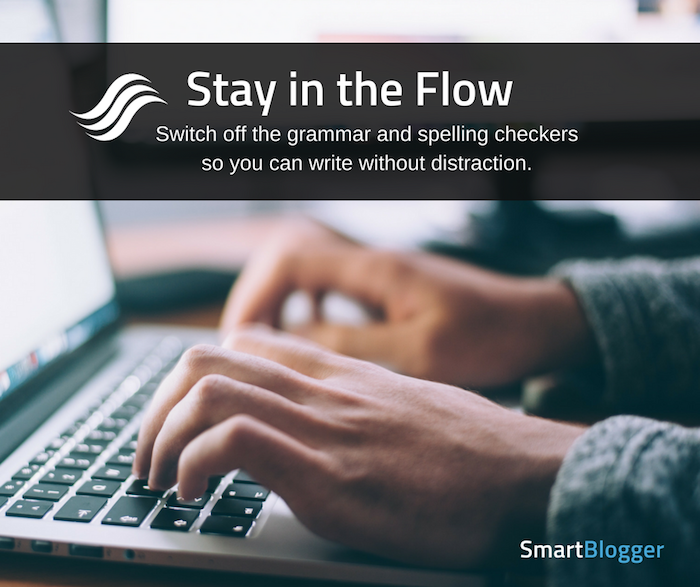
Guess what? You have the power to switch off the checkers so you’re able to write without distraction. You can always run them after you’ve finished your writing if you need to.

stay in the flow

#5. Invest in a Faster Pen


Like to write first drafts or take notes by hand? The Hack My Study site did a comparison on which pens are the fastest to write with.

Here’s a spoiler: Fountain pens are best for pure speed, but they’re also pricey and difficult to master. The next best option is a rollerball pen. These are less expensive, but they’re still fast because they create little friction on the writing surface.

The third best for speed is the gel pen, which is less expensive than the rollerball, and coming in dead last is the standard ballpoint pen — you know, the kind you pick up for free at your local bank or dentist’s office.

I can attest to the speed of the rollerball; a few years ago I decided to toss out every junky pen in the house and replace them with a few dozen of my favorite brand, the Pilot Precise V7 Rolling Ball Fine — blue for me, black for my husband, and red just because. That way, whenever I’m in the mood to write a draft or take notes by hand, I can reach into a kitchen drawer or my purse and be assured of pulling out a fast, smooth-writing pen every time.

Stocking up on quality pens is an investment (it costs around $20 for a 12-pack of the Pilot pen I use), but it’s worth it if it helps you write faster. Not to mention you’ll never again waste precious writing seconds furiously scribbling on a sheet of scrap paper to get the ink flowing in your cheap ballpoint.

#6. Do B-Minus Work


One of the chief habits that keeps you stuck in slow motion is editing yourself while writing. There’s nothing like agonizing over the perfect word in the middle of writing a blog post or article to keep you in perpetual “not quite finished” mode. (That habit, of course, is a consequence of perfectionism, another common bugaboo for writers.)

Value done over perfect and let the words fly. Give yourself permission to do B-minus work just to get the ideas down on paper, then go back and edit when you’re done. Chances are, you’ll discover your writing was pretty good to begin with!

let the words fly

The more you resist editing yourself as you write, the easier writing will become. The easier writing becomes, the more confident you’ll be. And the more confident you are in your writing, the quicker the process gets.

#7. Get Zen Before You Pick Up Your Pen


If your writing slows to a virtual crawl because you feel the need to check Facebook or answer an email after every sentence, you’ll love OmmWriter, a program that blocks out the files and applications behind the writing page to minimize distractions.

OmmWriter also offers a selection of calming background colors and music to keep you in Zen mode as you write, plus soothing sounds with each keystroke. I especially love the horizontal cursor (instead of the usual vertical blinking one) that seems to say “Write on” instead of “Stop writing!”

Ommwriter was free when I downloaded it several years ago, but is now a pay-what-you-want app; the average offering is $7.33.

#8. Stop Letting the Schedule Push You Around


Sometimes a little space is all you need to get perspective on a piece of writing that’s giving you fits, so you can get the words out faster.

An example: Last week I had scheduled myself to write an article for my website called “How Writers Waste Time by Saving Time,” about the dangers of cutting corners in your research and interviews. I eked out about 500 (crappy) words at a glacially slow pace before giving up; the article sounded more like a rant than a solid service piece, and I just couldn’t figure out how to fix it.

Then I looked over my ideas for future articles, and one called “Let Future You Handle Your Writing Problems” jumped out at me. I was inspired! I opened a new Word file, and that article — all 900 words — poured out of me in less than 60 minutes.

This week, I revisited the article I had been stuck on, and immediately saw exactly what the problem was and how to resolve it. An hour later, that article was done too.

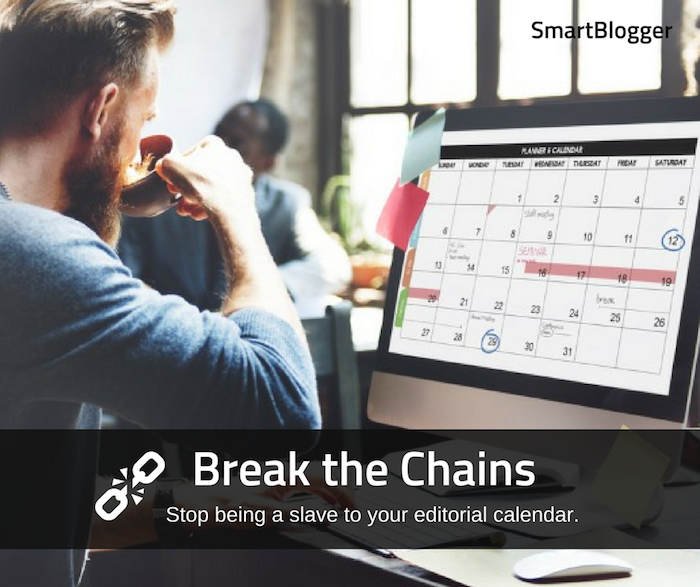
If you have control over what you write and when you write it, this tip is for you: Stop being a slave to your editorial calendar. When you’re wrestling with a scheduled article or post, let it go. Scan over your editorial calendar and see if there are any post ideas that get you all fired up, and make the switch. You’ll find that the writing flows much faster that way.

stop being a slave to your editorial calendar

#9. Play Games to Boost Your Words Per Minute


A big problem for many writers is that we think faster than we type. If your brain is churning out amazing ideas and perfect turns of phrase at a blazing pace, but you type slower than my husband trying to help me come up with a funny metaphor for something slow — you’ll finish out your allotted writing time with a only fraction of your page filled with, you know, writing.

Learning to type is a lot more fun than it used to be, with many sites offering free games, lessons, and tests to help you up your keyboarding speed. FreeTypingGame.Net has, among other goodies, a game called The Frogs Are Off Their Diet. A similar site, WordGames.com, offers hilariously titled typing challenges like Zombie Typocalypse and Type Type Revolution.

If you often find yourself writing on the go, seek out free apps that will help you learn to type faster on your smartphone or tablet. TapTyping is one example for the iPad, iPhone, and iPod Touch, and Typing Master is an app that works on Android devices.

#10. Gamble with Your Reputation


Feeling competitive? Challenge yourself to write your blog post, article, or book chapter in a (much) shorter amount of time than you normally would.

I did this once while working with a friend at a café and her jaw dropped open as she watched me complete an 800-word article in 30 minutes. (And yes, it was good!)

Even better, bet a friend something juicy that you can do it, or throw down the gauntlet on social media. The more people who see it and the harsher the consequences should you lose, the more likely you are to get those words down on the double.

On the low-pressure end, I also like to do mini challenges: I’ll see how much I can write in the five minutes while my tea steeps … in the two minutes before the microwave dings and my lunch is ready … while I’m on hold with AT&T before someone picks up. It’s incredible how quickly you can write when you have mere minutes to get it done.

challenge yourself

Be More Prolific than You Ever Thought Possible


Fab news! It took me years to develop and learn these effective tactics for writing like a bat out of hell, but you can try them all on right now.

Feel free to combine tactics: Turn off the grammar checker, down a couple glasses of water, fire up Ommwriter, and use a text expander app to produce B-minus work.

Chances are you’ll boost your speed many times over, so you can do even more of what you love (hint: writing) every day.

Ready for the writing to simply pour from you? Set your timer and get started!

About the Author: Linda Formichelli has been a full-time freelance writer since 1997. If you’re marketing your butt off and getting nowhere, Linda’s theory is that it’s because you’re doing all the right things—and getting overwhelmed by it all. Instead, check out her upcoming Volume Marketing Challenge for Freelance Writers. During this fun, intense challenge, each week you’ll do the heck out of one type of marketing to reveal the one that will get you the most freelance writing assignments. Registration opens March 3!


source https://smartblogger.com/how-to-write-faster/

The Ultimate Equipment Guide for Doing Online Video

In this live episode, I’ll be hooking you up with the best equipment for doing online video. But before we start, there’s something very important that I have to say:

The equipment doesn’t matter as much as the actual content.

It doesn’t matter how professional your setup is or how much money you invest in fancy stuff if your content isn’t there. Equipment is just a tool that helps you tell a story. The content is where it starts.

But if you’re ready to take your videos to the next level and make yourself look and sound more professional, then this is the episode for you!

Webcams

Let’s start by looking at a basic setup for recording videos from your computer. This is great for Skype interviews or for recording yourself in front of a webcam on a Mac or PC.

Many laptops come with a built-in webcam, and you can just use that. It works. It gives you a decent quality.

Logitech C920

Logitech C920

But if you want to step it up to the next level, there’s only one webcam for the job. It’s the Logitech C920 webcam. This is an HD webcam, which gives you significantly higher quality.

However, if your video is awesome, but your audio sucks, people will notice. People are actually more likely to notice low-quality audio than low-quality video.

If you just use the microphone on your computer, the quality won’t be as good. You’ll get background noise from the room, and your voice won’t be as clear.

So how do you increase your audio quality? You buy a microphone.

Audio Technica ATR2100 USB

Audio Technica ATR2100 USB

The one I recommend for most people to start with is the Audiotechnica ATR 2100 USB.

I love this microphone because there’s a USB port, so you can connect it directly to your computer. That means I can just plug it into my laptop and start talking.

There’s also an XLR port, which allows me to plug it into a mixer or an audio interface. So if in the future you expand and set up a podcasting studio, you could still use this microphone. That’s why I highly recommend it!

Equipment for Smartphones

Now let’s say you want to step it up a little more. You don’t just want a webcam, you actually want a high-quality video camera.

iOgrapher

iOgrapher

Start with your phone. I have an iPhone 6 Plus, and the camera on this thing is amazing. I have seen some very high quality video production done with an iPhone!

I can just use that device by itself. But I can also add accessories to crank it up a notch.

First, the iOgrapher. This allows me to hold my phone with two hands and get a much steadier video. You can also get lenses to connect to this device to make your video even better. It has mounts so that I can connect a microphone, or lights, or other things that will expand the functionality of the phone. It can also mount to any standard tripod. Pretty cool.

Rode TRRS to TRS Adaptor

Rode TRRS to TRS Adaptor

You can also get lavalier mics or lapel mics that connect to your phone. What’s great is that this puts the mic really close to your mouth, which helps you get clear audio. The one that I recommend the Røde SmartLav Plus.

You’ll also need a TRRS to TRS connector. This plugs into your phone, and then you can plug a microphone into the other end. That way, the mic will pick up sound for the video you’re doing on your phone.

Satechi Bluetooth Remote

Satechi Bluetooth Remote

One last device that I recommend if you’re using a smartphone: a Bluetooth remote control. The one that I have is a Satechi.

This allows me to easily press “play” if I have the phone set up on a tripod or somewhere that’s not within reach. It also has volume control, previous and next buttons, and a mute button. It even has a keypad built in! This one is a little more expensive than some, but I like it because of the functionality it gives you.

Point and Shoot Cameras

So now you want to step up from the smartphone, but you don’t really want a DSLR. That’s where point and shoot cameras come in.

Sony DSC RX100

Sony DSC RX100

I have the Sony DSCRX100. There are different versions of this camcorder. I have the Mark 2, there’s also the Mark 3 and the Mark 4. Mine is a few years old. Mark 3 and 4 are newer.

This camcorder gives you a really high quality video, better than iPhone.

It doesn’t have a traditional microphone input, which doesn’t give you all the functionality, unfortunately.

Sony ECM XYST1M

Sony ECM XYST1M

However, it does allow you to connect a Sony microphone (ECM SYXT1M), which is a shotgun microphone. Mine has a stereo option and comes with a “dead cat,” which is a fuzzy thing you can put over the mic to help cut out background noise like wind.

DSLR

The next step up is a DSLR. These are a little bulkier, a little heavier, and more inconvenient to carry around. But if you know what you’re doing, the quality just doesn’t get better.

You have more manual control with a DSLR, which is a very good thing.

I’m using a relatively old one: a Canon 60D. They don’t even make it any more! But it still works, and you could still get it used for probably $300-400.

Canon 80D

Canon 80D

The latest version is the Canon 80D, and that one has a touchscreen. So on an 80D, I can tap on your face and it will focus on your face. It also has better autofocus. But it’s going to be more expensive.

If you’re using a DSLR, the lens makes the video or the picture. The better the lens, the better the image.

Once you’re in a particular “ecosystem” for DSLR–whether it’s Canon or Nikon or whatever–you’ll probably stick with it because you’ll start buying lenses. I have a Canon, and if I were to buy a Nikon, I couldn’t use any of my Canon lenses

Canon 50 mm f1.8 Prime lens

Canon 50 mm f1.8 Prime lens

There’s one affordable lens ($125) that you absolutely have to invest in: a prime lens. It’s 50mm fixed, and what’s awesome about this is that it has a very low aperture number: F1.8.

Aperture is a measurement of the diameter of the lens; an F1.8 lens lets in a significantly higher amount of light, which allows you to get higher quality images even in low light. It also gives you shallow depth of field, which means that it’ll focus on me and the background will be really blurry. This is the best $125 I ever spent. You need this lens.

The downside to the 50mm is that it’s fixed, so I can’t zoom with it. I have to be about 5 feet away from the subject. If I want to zoom, I need another lens.

Tamron SP 24-70mm Di VC USD

Tamron SP 24-70mm Di VC USD

My go-to all-purpose lens is the Tamron SP 24-70mm F2.8. The aperture number, F2.8, is still pretty low, so the video is very high quality.

If I’m at an event, or if I’m filming my kids at home, this is most likely what I’m using. It is a monster, size-wise, but it allows me to really get in there are really do interesting things. This is my go-to lens for just about everything unless I’m at home in my studio, with my camera on a tripod.

Rode Videomic Pro

Rode Videomic Pro

When I am using my DSLR, there are different microphones that I use. When I’m running around and it’s not just me that’s talking, I use the Røde VideoMic Pro. It’s a shotgun microphone. That means it’s going to pick up what it’s pointing at, and not much else.

It’s similar to the boom mics you see on TV shows or things like that. The benefit is that you don’t have to have a lapel mic, which is visible on the video.

Rode Videomic Go

Rode Videomic Go

There’s also the Røde VideoMic Go, which is a bit more affordable. It’s not as professional, but it still gets the job done.

These mics will also connect to your DSLR or your phone if you have the adapter I mentioned earlier.

Facebook Live

Blackmagic Design UltraStudio MiniRecorder

Blackmagic Design UltraStudio MiniRecorder

How am I going live using a DSLR or a camcorder? With my Blackmagic Design UltraStudio Mini Recorder! This allows me to connect via Thunderbolt to my computer, and then connect my camera through HDMI.

The program that I use to live stream is called WireCast, and I love it!

Equipment Used for This Episode

The lapel microphone that I’m using in this broadcast is the Sennheiser EW100G3. It has a transmitter that is connected to the person speaking, and a receiver that is plugged into the camera. This one is pretty pricey, but there are more affordable models out there (even down to $100).

Canon VIXIA HF G20

Canon VIXIA HF G20

I’m also using a Canon Vixia HF G20 camcorder tonight, because the Canon 60D shuts off after 30 minutes. With the camera I’m using, I could do this live broadcast for hours and it would keep going. It’s not a DSLR camera, so you can’t use your DSLR lenses with it.

Joby Gorillapod

Joby Gorillapod

I would also recommend the Joby Gorillapod. It’s basically a small tripod that can be used to hold just about anything. Right now I’m using it to hold my webcam, but I can also use it to hold my DSLR. It’s great for getting stable video.

I’m using two soft box lights for this video. I use two so that both sides of my face are lit evenly.

I don’t like them because they are HUGE. They’re not very portable.

However, there are so many smaller lights on the market right now. LED lights are great because they don’t get hot and they’ll fit in a backpack. I don’t have those myself, but the one that has been recommended to me is Neewer Dimmable Bicolor LED.

There’s also a product called the Diva Light that goes around your camera and does a great job of lighting your face. You can get a small one that plugs into your phone, too.

In this episode, I also have a light behind me on the floor. This helps to put some separation between me and the background.

Neewer Dimmable Bi-color LED

Neewer Dimmable Bi-color LED

Lighting really adds quality to your video. If you’re in a place where you’re stationary, I highly recommend having some kind of lighting. But make sure you test it out. The setup you need depends on the room you’re in.

Finally, I’m using a teleprompter to see live comments for this episode: Pad Prompter. The teleprompter has my iPad in it, which is being projected onto the teleprompter screen.

To set this up, I installed a script on my server. You can find it on GitHub. It’s open source, and I was able to install it and configure it to show any comments on the live streams of my video.

Resources Mentioned

Infographic

The Ultimate Equipment Guide for Doing Online Video

The Ultimate Equipment Guide for Doing Online Video

The post The Ultimate Equipment Guide for Doing Online Video appeared first on Become A Blogger by Leslie Samuel.


source http://www.becomeablogger.com/24409/ultimate-equipment-guide/